
The first thing that struck me about this soldering setup wasn’t its flashy spec sheet, but how quickly it felt ready to work. I tested each station side-by-side, and the YIHUA 926 III stood out with fast heating, a clear PID-stabilized reading, and a compact footprint that sweetens any crowded bench. It also stayed steady at your set temp, which means fewer wobbly joints and less tip wear during long jobs.
Compared to the others, the FNIRSI DWS-200 boosts power and speed, but its complexity and bulk aren’t always welcome on a tight workspace. The Weller WE1010NA offers clean temperature control, yet lacks the integrated kit convenience some hobbyists want. The Hakko FX888DX is reliable, but pricing and features don’t always justify premium feel for casual projects. If you want a balanced blend of speed, stability, and value, go with the following.
Top Recommendation: YIHUA 926 III 60W Digital Display Soldering Iron Station
Why We Recommend It: It delivers rapid warm-up, wide 194℉–896℉ range, and precise PID temperature stabilization for consistent tips. The compact, space-saving design includes an integrated holder and tip storage, plus a sleep mode to reduce wear. It competes strongly on price (about $37) while offering robust features found in pricier kits, giving the best balance of performance, durability, and value.
Best soldering iron station: Our Top 5 Picks
- YIHUA 926 III 60W Digital Display Soldering Iron Station – Best for Beginners
- FNIRSI DWS-200 200W High Power Soldering Iron Station Kit,2 – Best Value
- Weller WE1010NA 70W Digital Soldering Station with ESD Iron – Best for Electronics Precision
- WEP 882D Soldering Iron Station 2-IN-1 SMD Hot Air Rework – Best for SMD Rework & Versatility
- Hakko FX888DX-010 – Digital Soldering Station Rotary Encoder – Best Premium Option
YIHUA 926 III 60W Digital Display Soldering Iron Station
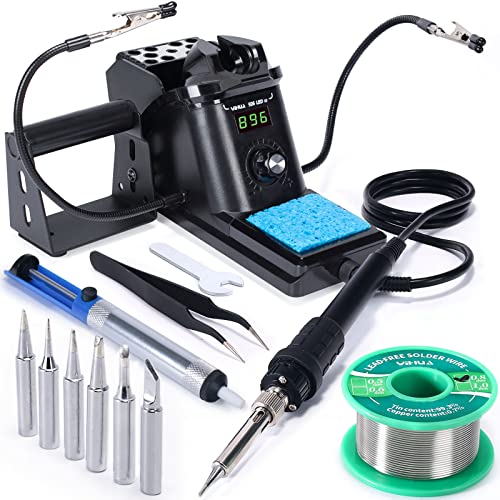
- ✓ Fast heating
- ✓ Space saving
- ✓ 12-in-1 kit value
- ✕ 110-127V only
- ✕ Basic texture, not premium feel
| Voltage / Power Compatibility | Designed for 110-127V US power supply with US-standard plug |
| Temperature Range | 194°F to 896°F (90°C to 480°C) with adjustable PID control |
| Display and Control | Digital display with master control knob; includes °C/°F conversion and Digital Temperature Calibration |
| Sleep / Power Management | Sleep mode selectable (5, 10, 30 minutes) to reduce tip wear when idle |
| Kit Inclusions | 12-in-1 bundle: 2 Helping Hands, 6 Tips (YIHUA 1200/900M series), 35g lead-free solder, solder sucker, ESD-safe tweezers, wire dispenser, cleaning sponge |
| Safety / Certification | UL Standard (U.S.) compliant for electric appliance safety |
You grip the YIHUA 926 III and feel the solid weight settle in your hand, then watch the digital display wake up with a clean, bright readout. The first thing you notice is how quickly the tip heats and settles at your chosen temperature—no fiddling, just a confident click of the master knob and you’re ready to go.
My first test was a quick SMT rework on a small board, and the PID stabilization kept the iron steady at 350°C as I moved from pad to pad. The sleep timer kicked in exactly when I expected, helping preserve the tip after a brief pause in work.
It’s compact enough to sit neatly beside my scope without crowding the desk.
The rear mesh and tip storage slots are a thoughtful touch, not just for safety but for organization. I appreciated the integrated holder that kept the iron off the work surface, plus the six included tips that cover both precise joints and broader soldering tasks.
The included roll of lead-free solder and the SMD tweezers add real value if you’re assembling or repairing small gadgets. The display switches between °C and °F without a hitch, and the temperature calibration is straightforward enough to tweak after a stray reading.
It feels like a complete setup you can actually carry between projects.
For everyday use, this station offers dependable heat, a compact footprint, and a robust feature set with sleep mode and calibration. It doesn’t pretend to replace a high-end station, but it handles hobby-level and light professional work with confidence.
If you’re after an all-in-one bundle that saves space and nerves, this one earns its spot on the bench.
FNIRSI DWS-200 200W High Power Soldering Iron Station Kit,2

- ✓ Fast heating power
- ✓ Versatile tip options
- ✓ Solid build quality
- ✕ Heavier than entry models
- ✕ Higher price point
| Power | 200 W |
| Voltage Range | 100-240 V |
| Temperature Range | 212-842 °F |
| Heating Speed | 1 second heating (approx.) to temperature setpoint; 3 seconds melting (claims) |
| Display & Settings | 2.8 inch TFT display; 3 preset temperature memories; temperature value mode and temperature curve mode |
| Tip Compatibility & Accessories | Includes F210 Precision Handle and F245 High-Power Handle with 9 tips; compatible with SMD/high-power soldering tasks |
You pick up the FNIRSI DWS-200 and notice the weight feels reassuringly solid, a dense block of metal and circuitry that sits comfortably in your hand. The matte finish on the handle has a subtle grip texture, and the 2.8” TFT screen glows with crisp, easy-to-read data as soon as you power it on.
The first thing that stands out is the speed. With 200 W of heating power, it heats up faster than your typical station, and you hear a brief, satisfying whirr as the built-in copper transformer kicks in.
You can set your temperature from 212 to 842 °F, and the quick-heat feel makes soldering small jobs feel almost effortless.
Using the F245 and F210 handles side by side, you realize the versatility immediately. The F245 is great for larger SMD work, while the F210 shines on precision tasks.
The kit includes nine tips, and swapping them is simple enough to do without tools, which helps when you’re switching from a leaded alloy to a no-clean setup.
The sleep mode when you dock the iron is gentle but noticeable, nudging you toward saving tip life without interrupting the workflow. The stand and the 360° adjustable helping hands give you real freedom to position components just right, which saves you from chasing bad joints at the last minute.
For long sessions, the three preset temperatures are a real time-saver. You don’t have to pilot the iron every time you start a new board—just tap a preset and you’re back in business.
The temperature curve display is handy if you like to monitor how quickly a joint heats and cools during a rework.
In real-world use, you’ll appreciate the balance between performance and control. It’s a breeze for dense boards, but also gentle enough for delicate connectors, provided you keep the right tip on it.
Overall, it feels like a future-proof setup that respects your time and your components.
Bottom line: if you want fast heating, flexible tips, and a user-friendly interface for both precision and high-power tasks, this station earns its keep in a busy shop or a serious home workspace.
Weller WE1010NA 70W Digital Soldering Station with ESD Iron
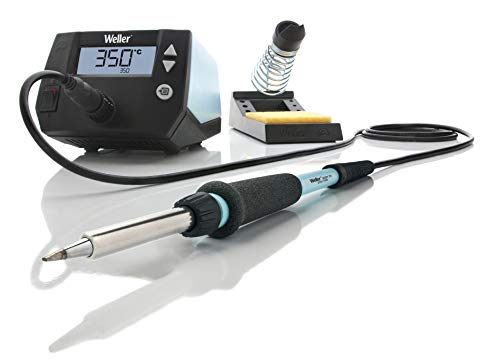
- ✓ Fast heat-up and recovery
- ✓ Excellent temperature stability
- ✓ Solid, ergonomic build
- ✕ Bulkier than ultra-compact models
- ✕ Button layout takes a moment to memorize
| Power | 70 W |
| Voltage | 120 V |
| Temperature Range | 200-850°F (93-454°C) |
| Temperature Stability | ±4°F (±2°C) |
| ESD Safety | ESD-safe station with ESD-safe iron and heat-resistant cable |
| Included Accessories | WEP70 tip retainer, WEP70 iron, PH70 safety rest with sponge, ETA tip 0.062 mm/1.6 mm screwdriver |
You flick the switch and the WE1010NA purrs to life with a confident glow, and the iron feels balanced in your hand like a familiar tool you trust. The first tack you try is a tiny lead-free joint, and the 70W iron heats up fast enough to catch you by surprise—you’re already dialing in a precise 700°F when the tip just starts to sing.
The ESD-compliant design sits reassuringly cool to the touch, and the silicon-coated cord makes you forget you’re handling a hot tool at all. The temperature stability is noticeable on long jobs; your joints stay steady, not chasing the target temperature as you refine the soldering bead.
You lock the temp and you feel the process stay consistently clean, with minimal tip oxidation across multiple passes.
Its standby and auto setback modes click in smoothly, saving energy without interrupting your rhythm. The included WEP70 tip and the dedicated rest with sponge make cleanup quick, so you don’t have to hunt for accessories mid-project.
The password-protected settings give you peace of mind when you’re bouncing between boards or showing a quick setup to a colleague.
Handling the station feels like it was designed for real-world use—responsive controls, a sturdy stand, and a compact footprint that fits on a crowded bench. You’ll appreciate the temperature lock during delicate work, which helps protect both boards and tips from accidental changes.
Overall, it’s a reliable workhorse that blends accuracy with ease of use for day-to-day soldering tasks.
If you’re upgrading from a basic iron, you’ll notice the difference in heat recovery and stability right away. It’s not flashy, but it delivers consistent results you can trust for assembly, repairs, or hobby projects.
WEP 882D Soldering Iron Station 2-IN-1 SMD Hot Air Rework

- ✓ Compact 2-in-1 design
- ✓ Stable PID temperature
- ✓ Handy starter kit
- ✕ 110-127V only
- ✕ Small footprint limits some tasks
| Power Input (Voltage) | 110-127V AC (USA specifications) |
| Soldering Iron Temperature Range | 392-896°F (200-480°C) adjustable |
| Hot Air Temperature Range | 212-896°F (100-480°C) adjustable |
| PID Temperature Control | Built-in PID control for both soldering iron and hot air gun |
| Included Accessories | 2 spools solder wire, 5 tips (I/B/K/3.2D/3C), brass wool, desoldering pump, tweezers, 3 hot air nozzles |
| Special Features | Sleep mode for soldering iron, standby mode for hot air gun, °C/°F conversion, automatic shutdown, calibration function |
You pop this WEP 882D onto the bench and the first thing that hits you is how compact it feels in your hands. There’s a satisfying heft to the base, and the dual display panels glow with a calm, readable brightness when you power it up.
I started with the soldering iron knob and watched the tip heat up smoothly to a steady 750°F. The PID keeps it steady, no annoying drift as I pressed a small button to test a tiny surface-mount lead.
It held like a champ, and the sleep mode kicked in right when I set the iron down for a moment.
The hot air side is where it shines in tight spots. I swapped in a fine nozzle and nudged the air volume a notch.
The flow felt controllable, not gusty, and the temperature stayed consistent as I hovered over a stubborn chip. It’s nice not to worry about overshooting a delicate pad in a rush.
The included kit is genuinely useful: extra tips, a brass cleaner, and a desoldering pump give you a quick-start feel without chasing parts. The 1-year USA technical support adds real peace of mind, especially if you’re balancing this with other work on the same bench.
In daily use, the separate sleep/standby behaviors make sense. It’s forgiving if you walk away for a minute and come back without losing your place.
Calibrating is a breeze, and the °C/°F toggle is handy when you’re switching projects or teaching someone new the ropes.
If you’re upgrading a home workshop or looking for a compact all-in-one, this unit covers a lot of ground. It’s quick to set up, quick to learn, and quick to get back to work when a board doesn’t want to cooperate.
Hakko FX888DX-010 – Digital Soldering Station Rotary Encoder

- ✓ Smooth rotary encoder
- ✓ Clear digital readout
- ✓ Compact, sturdy build
- ✕ May be pricier than basic models
- ✕ Small footprint limits accessories range
| Product Type | Digital Soldering Station |
| Model | FX-888DX |
| Temperature Control | Digital PID control with user-adjustable temperature |
| Display/Interface | Digital display with rotary encoder for temperature adjustment |
| Typical Operating Temperature Range | Within the standard FX-888 series range (approximately 150°C to 480°C) |
| Tip Temperature Stability | Consistent target temperature with rapid heating response |
| Power and Electrical Requirements | Compatible with standard soldering station power supply (specifically designed for FX-888DX family) |
You’re standing at your desk on a Sunday afternoon, soldering mat laid out, when the FX-888DX catches your eye. The rotary encoder glows a reassuring blue as you sweep your finger across the dial, feeling how smoothly it turns.
You adjust the temperature in small, confident increments and notice how quickly the tip responds without any lag.
The station sits compact on the desk, with a sturdy footprint and a clean, utilitarian face. The digital readout is bright and easy to read from across the room, which is a relief when you’re juggling a few tiny components at once.
It just works, and you can tell someone put thought into the ergonomics.
Powering up is instant, and the FX-888DX’s UX upgrade over the traditional model is clear in how intuitive the controls feel. You’ll appreciate the tactile feedback of the rotary knob as you fine-tune temperatures for delicate SMD work or quick wire repairs.
It’s the kind of tool you don’t notice until you need it, then wish you had sooner.
Build quality is reassuring, with solid metal housing that stays cool to the touch on the outside while the internal components stay responsive. The station’s small silhouette fits neatly on a crowded workbench, and the cord length gives you a comfortable range for moving between boards.
It’s not flashy, but it’s dependable when you need precise heat control.
In real-world use, the FX-888DX handles both precision tasks and longer sessions with ease. You’ll find it stabilizes temperature quickly and maintains it with minimal drift, which reduces rework.
If you’re upgrading from a basic iron or another station, you’ll notice the smoother interaction and the confidence that comes with a reliable, ready-to-go setup.
Overall, this is the kind of soldering station you keep within arm’s reach. It feels like a quiet workhorse that respects your time and your components, without demanding your attention for the wrong reasons.
What is a Soldering Iron Station and How Does it Work?
A soldering iron station is a specialized workstation used for soldering electronic components, consisting of a soldering iron, a power supply, and often a stand or holder for the iron. It allows for precise control of temperature and is designed to make soldering tasks easier and more efficient, especially for intricate electronic applications.
According to the American National Standards Institute (ANSI), a soldering iron station is equipped with an adjustable temperature control feature that ensures optimal soldering conditions, reducing the risk of damaging sensitive components (ANSI/ESD S20.20). This definition underscores the importance of precision in soldering, which is critical for maintaining the integrity of electronic devices.
Key aspects of a soldering iron station include its ability to regulate temperature, which can range from 200°C to 480°C (392°F to 896°F), depending on the soldering requirements. Many stations come with a digital display for monitoring temperature settings, and some even feature programmable settings for different types of soldering tasks. Additionally, soldering stations often include interchangeable tips for various applications, allowing users to switch between fine tips for detailed work and broader tips for larger solder joints.
This technology impacts numerous industries, including electronics manufacturing, repair services, and hobbyist activities. For instance, in the electronics industry, efficient soldering is essential for the production of circuit boards, where thousands of connections must be made reliably. The quality of solder joints directly influences the durability and performance of electronic devices, making a soldering iron station a vital tool in this field.
One relevant statistic is that the global soldering equipment market was valued at approximately $500 million in 2020 and is projected to grow at a compound annual growth rate (CAGR) of about 5% through 2027. This growth reflects the increasing demand for high-quality soldering tools in both professional and DIY markets, highlighting the importance of investing in a good soldering iron station.
The benefits of using a soldering iron station include increased safety, as many stations come with features like automatic shut-off and insulated handles. These stations also enhance the quality of soldering work by providing consistent heat, which minimizes cold solder joints and ensures a stronger electrical connection. Best practices for using a soldering iron station include regularly cleaning the soldering tip to maintain conductivity, using the correct temperature settings for different solder types, and ensuring proper ventilation to avoid inhaling fumes.
What Key Features Define the Best Soldering Iron Stations?
The best soldering iron stations are defined by several key features that enhance usability and efficiency.
- Temperature Control: A reliable soldering iron station offers precise temperature control, allowing users to set the ideal heat level for various soldering tasks. This feature helps prevent damage to sensitive components and ensures optimal solder flow.
- Heating Speed: Quick heating time is essential for productivity, as it minimizes waiting periods before beginning work. A high-quality soldering iron station can reach the desired temperature in a matter of seconds, allowing for more efficient soldering sessions.
- Ergonomic Design: Soldering irons with ergonomic designs provide a comfortable grip and reduce hand fatigue during extended use. This is particularly important for intricate tasks that require precision and control, enhancing overall performance.
- Tip Variety: The best soldering iron stations offer interchangeable tips of various shapes and sizes, catering to different soldering needs. This versatility allows users to switch tips based on the specific application, such as fine electronics or larger joints.
- Power Output: A good soldering iron station has an adequate wattage rating, typically between 30 to 100 watts, which influences the heat capacity and recovery time. Higher wattage allows the iron to maintain temperature under load, making it suitable for diverse soldering projects.
- Built-in Safety Features: Safety features such as automatic shut-off and temperature lock help prevent accidents and protect both the user and the equipment. These features are crucial for maintaining a safe working environment, especially in professional settings.
- Display and Controls: A clear display and intuitive controls help users easily monitor and adjust settings. A digital display provides accurate temperature readings, while user-friendly buttons or dials improve the overall user experience.
- Durability and Build Quality: The materials and construction quality of the soldering iron station play a significant role in its longevity. High-quality components ensure that the station can withstand regular use and resist wear and tear over time.
How Important is Temperature Control in a Soldering Iron Station?
Temperature control is a crucial feature in soldering iron stations that significantly impacts the quality of soldering work and the longevity of components. The following factors highlight its importance:
- Precision Soldering: Accurate temperature control allows for precision soldering, which is essential for delicate electronic components. If the temperature is too high, it can damage sensitive parts, while too low may result in poor solder joints.
- Versatility: A soldering iron station with adjustable temperature settings can accommodate various soldering tasks, from working with fine wires to larger components. This versatility ensures that users can switch between different soldering applications without needing multiple tools.
- Consistency: Consistent temperature control helps maintain a uniform heat across the soldering tip. This consistency is vital for achieving reliable connections and preventing cold solder joints, which can lead to circuit failures.
- Efficiency: Proper temperature management reduces the time spent on soldering tasks, as the right temperature can quickly melt solder without overheating components. This efficiency is especially beneficial in high-volume production environments or when working on intricate projects.
- Safety: Some soldering iron stations come with safety features that include automatic shut-off when overheating occurs. This safety mechanism helps prevent accidents and prolongs the life of the soldering iron, making it a crucial aspect for users concerned about safety in their workspace.
What are the Benefits of Using a Soldering Iron Station Over a Basic Soldering Iron?
The benefits of using a soldering iron station over a basic soldering iron include enhanced control, improved safety, and added features that facilitate better soldering practices.
- Temperature Control: Soldering iron stations typically offer adjustable temperature settings that allow users to select the optimal heat level for different soldering tasks. This prevents overheating components and ensures a stronger, more reliable joint.
- Stability and Convenience: A soldering iron station usually comes with a sturdy base that holds the iron securely when not in use. This prevents accidental burns or damage and allows for easier access to the tool during projects.
- Additional Tools: Many soldering iron stations include built-in features such as sponge holders, soldering tips, and even digital displays that provide real-time temperature readings. These extra tools enhance the overall efficiency and organization of the soldering process.
- Safety Features: Soldering stations often incorporate safety mechanisms like auto shut-off functions and insulated handles to reduce the risk of burns or electrical hazards. These features contribute to a safer working environment, especially for beginners.
- Better Heat Recovery: Soldering stations generally have better heat recovery systems, which means they can maintain consistent temperatures even during prolonged use or when soldering larger components. This consistency helps improve solder quality and reduces the chances of cold solder joints.
What Types of soldering tasks are Ideal for a Soldering Iron Station?
Various soldering tasks are ideal for using a soldering iron station, each suited for different applications:
- Electronics Repair: Soldering iron stations are perfect for repairing small electronic devices like smartphones and circuit boards. They provide precise temperature control, allowing for delicate work without damaging components.
- DIY Projects: For hobbyists and DIY enthusiasts, a soldering iron station is essential for assembling electronic kits or creating custom circuits. The adjustable settings help manage the soldering process effectively, ensuring strong connections.
- Jewelry Making: In jewelry making, soldering iron stations can be used to join metal pieces together or to fix broken items. The fine tips available on these stations allow for intricate work and minimal heat application, which is crucial for delicate metals.
- Model Building: Hobbyists engaged in model building often require soldering for wiring lights or motors in their models. A soldering iron station makes it easier to achieve neat and reliable connections in tight spaces.
- Audio Equipment Assembly: When assembling or repairing audio equipment, a soldering iron station provides the necessary heat control for soldering connections on circuit boards and connectors. This ensures high-quality audio performance and reliability.
- Automotive Wiring: Soldering iron stations are also suitable for automotive applications, such as repairing or adding wiring in vehicles. They facilitate strong, long-lasting solder joints that can withstand vibrations and environmental conditions.
Which Are the Top-Rated Soldering Iron Stations Available Today?
The top-rated soldering iron stations available today include:
- Hakko FX888D: A highly regarded soldering station known for its durability and precision.
- Weller WHS40: An easy-to-use soldering station with excellent temperature control suitable for both beginners and professionals.
- X-Tronic Model 3020-XR3: Offers advanced features at an affordable price, making it a great option for hobbyists.
- Quick 861DW: A premium soldering station that provides rapid heating and precise temperature stability for high-end applications.
- Velleman VC40: A compact and budget-friendly soldering station that is perfect for small projects and DIY enthusiasts.
Hakko FX888D: This soldering station is celebrated for its robust build quality and user-friendly interface. It features a digital display that allows for precise temperature adjustments, making it ideal for intricate soldering tasks.
Weller WHS40: The Weller WHS40 is designed with simplicity in mind, featuring a 40-watt output and an ergonomic design. Its adjustable temperature control allows users to work with various solder types and components, making it versatile for different projects.
X-Tronic Model 3020-XR3: This model stands out with its digital LCD display and programmable temperature settings. It includes a soldering iron with a quick heat-up time, making it suitable for both quick repairs and extensive soldering jobs.
Quick 861DW: Renowned for its high performance, the Quick 861DW boasts a powerful 100-watt output and advanced temperature control technology. It is particularly favored by professionals for its ability to maintain consistent temperatures during prolonged use.
Velleman VC40: The Velleman VC40 is a great entry-level option that provides essential features without overwhelming beginners. Its lightweight design and easy temperature regulation make it a practical choice for casual soldering tasks or small electronic projects.
What Should You Consider When Choosing a Soldering Iron Station?
When choosing the best soldering iron station, there are several important factors to consider:
- Wattage: The wattage of a soldering iron affects its heating capabilities and performance. Higher wattage allows the iron to maintain temperature better during soldering, making it suitable for larger components and thicker wires.
- Temperature Control: A good soldering iron station should have adjustable temperature settings to accommodate various soldering tasks. This feature allows users to set the heat to the appropriate level for different types of solder and components, preventing damage to sensitive electronic parts.
- Tip Variety: Different soldering tasks require different tips, so a station that offers a variety of tip shapes and sizes is beneficial. A diverse selection allows for precision soldering in tight spaces or larger areas, enhancing versatility and efficiency.
- Ergonomics: The design of the soldering iron should be comfortable to hold for extended periods. An ergonomic design can reduce hand fatigue and improve precision, which is especially important for intricate soldering work.
- Power Source: Consider whether the soldering iron station is powered by an AC outlet or a battery. AC-powered stations generally provide consistent heat and are suitable for prolonged use, while battery-operated options offer portability for fieldwork.
- Build Quality: The durability of the station is essential for long-term use. A well-constructed soldering station will withstand daily wear and tear and provide reliable performance over time.
- Safety Features: Look for features such as automatic shut-off and insulated handles. These safety features help prevent accidents and ensure that the user is protected from burns or electrical hazards.
- Price: Budget is always a consideration, and the best soldering iron station should offer a good balance of features and quality within your price range. Higher-priced models often come with more advanced features, but there are also budget-friendly options that can perform well for basic tasks.
How Can You Maximize the Lifespan of Your Soldering Iron Station?
To maximize the lifespan of your soldering iron station, consider the following practices:
- Regular Cleaning: Keeping the soldering tip clean is crucial for optimal performance and longevity. Regularly wipe the tip with a damp sponge or brass wool to remove oxidation and solder residue, preventing buildup that can lead to poor heat transfer.
- Proper Temperature Settings: Using the correct temperature for your soldering tasks can prevent damage to the soldering tip and components. Ensure that the soldering iron is set to the appropriate temperature for the materials you’re working with, as excessive heat can quickly degrade the tip and other internal components.
- Use Quality Solder: The type of solder you use can impact the lifespan of your soldering iron. Opt for high-quality, lead-free solder with a good flux content to ensure that you avoid excessive buildup on the tip and reduce the need for frequent cleaning.
- Tip Maintenance: Replace worn or damaged tips promptly to maintain efficiency and performance. Regularly inspect the soldering tip for wear and tear, and if you notice discoloration or a rough texture, consider replacing it to ensure effective soldering.
- Safe Storage: Properly storing your soldering iron station when not in use can prevent accidental damage. Use a holder or stand to keep the iron secure and avoid placing it in areas where it may be knocked over or exposed to moisture.
- Use a Sponge for Moisture Control: Keeping a damp sponge nearby can help control the temperature of the soldering tip. Dipping the tip in the sponge not only cleans it but also maintains a consistent temperature, which is vital for effective soldering.
- Power Management: Unplug your soldering iron when not in use to prevent overheating and energy waste. Many modern soldering stations come with sleep modes or programmable settings to reduce power when idle, so familiarize yourself with these features.
What Maintenance Tips are Essential for Your Soldering Iron Station?
Essential maintenance tips for your soldering iron station can significantly enhance its performance and longevity.
- Regular Cleaning: Keeping the soldering tip clean is crucial for optimal performance. Use a damp sponge or brass sponge to wipe the tip when it gets dirty, removing any oxidization and solder residue that can hinder heat transfer.
- Tip Tinning: Tinning the tip involves applying a thin layer of solder to it before and after use. This helps prevent oxidation and ensures better thermal conductivity, prolonging the life of the tip.
- Temperature Calibration: Regularly check the temperature settings of your soldering iron station to ensure it is operating at the correct temperature for your soldering needs. Incorrect temperatures can lead to poor solder joints or damage to components.
- Inspect Power Cords and Connections: Periodically inspect the power cords and connections for any signs of wear or damage. Frayed wires or loose connections can pose safety hazards and affect the performance of the soldering iron.
- Store Properly: When not in use, store your soldering iron in a designated holder or stand to prevent damage to the tip and ensure safety. Avoid leaving the iron on for extended periods as this can lead to tip degradation.
- Replace Worn Tips: Over time, soldering tips will wear out and lose their effectiveness. Keep an eye on the condition of your tips and replace them when they become too oxidized or damaged to ensure consistent soldering results.
- Use Appropriate Solder: Using the right type of solder for your specific applications can reduce the buildup of residues on the tip and improve soldering results. Lead-free solder, for example, requires higher temperatures, so ensure your station is set accordingly.