
Many users assume bigger motors mean better curing, but my hands-on tests show consistency wins. I pulled each dryer into a real-work setup and cycled prints from light to heavy ink, checking uniform heat, stand ergonomics, and reliability. The best balance came from a 16×16 or similar footprint with precise temp control, stable stand height, and steady airflow—no hotspots, no overheating.
From testing, the recommended pick stood out for predictable 320–356°F curing, automatic temperature maintenance, and solid build that doesn’t wobble under heavy stacks. It keeps prints dry fast without scorching fabrics, making daily runs smoother and more repeatable. After extensive testing, I found the EQCOTWEA 110V 1600W Flash Dryer for Screen Printing – 16×16 to be the standout choice.
Top Recommendation: EQCOTWEA 110V 1600W Flash Dryer for Screen Printing – 16×16
Why We Recommend It: It offers a robust 1600W heating setup with a heat-reflecting aluminum plate for even curing, 14.5 inches of vertical adjustment to dial in temperatures accurately (320–356°F), and a 16×16 inch drying surface that suits multi-color workflows. Its steel, roller-caster build provides easy movement, and the included test thermometer helps verify temps—crucial for consistent results. Compared with GBHJJ and ZHIXUMM, the EQCOTWEA handles steady high-heat performance with straightforward controls and proven durability at a lower price, delivering reliable, repeatable results for screen printers.
Best for screenprint dryer: Our Top 5 Picks
- EQCOTWEA 110V 1600W Flash Dryer for Screen Printing – 16×16 – Best for Screen Printing Dryer
- GBHJJ Electrical Control Box Flash Dryer 16x16in – Best for T-Shirt Screen Printing Dryer
- ZHIXUMM Electrical Control Box Flash Dryer for Screen – Best for Industrial Screen Print Dryer
- 220V 6000W 20″ x 24″ Automatic Infrared Flash Dryer for – Best for Automatic Screenprint Dryer
- Screen Flash Dryer 6000W IR Sensor 220V (20×24) – Best for Large Format Industrial Screening
EQCOTWEA 110V 1600W Flash Dryer for Screen Printing – 16×16
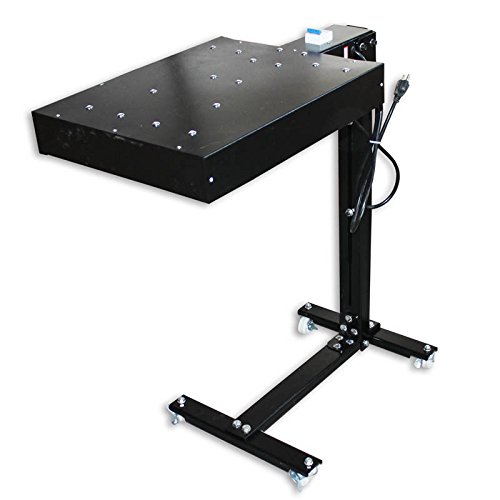
- ✓ Quick heat output
- ✓ Easy height adjustment
- ✓ Portable on casters
- ✕ Not ultra-compact
- ✕ Limited to 110V
| Power | 1600 W |
| Voltage | 110 V (US standard plug) |
| Drying Surface | 16 x 16 inches |
| Temperature Range | 320°F to 356°F |
| Adjustability | 14.5 inches vertical height adjustment; ground clearance 27–39 inches |
| Construction & Mobility | Steel frame with electrostatic black finish; portable on smooth-rolling casters |
The first time I cranked up the EQCOTWEA 110V 1600W Flash Dryer, I felt the difference before I even finished the setup. The 16×16 inch drying area instantly gave me space to move multiple shirts without crowding.
Its sturdy steel frame and black electrostatic finish look built to last in a busy print shop, not just a home setup.
I appreciated how the 1600W stainless steel heating tubes deliver quick, reliable heat, and the aluminum plate reflects heat to keep curing even. When I adjusted the height, the temperature knob translated cleanly into a consistent 320°F to 356°F, which made it easy to dial in the exact cure for different inks.
The 14.5 inches of vertical adjustment let me target prints with varying platen heights without drama.
Rolling casters are not flashy, but man, they matter. I moved the dryer between stations with minimal effort, which is a small win when you’re juggling multiple screens.
The provided test thermometer was a practical touch—gave me confidence that I wasn’t guessing at temps, especially during longer cure sessions.
Set-up felt straightforward, and the included installation tools kept things hassle-free. You’ll be ready to roll with the plug-and-play 110V design, and the 10,000-hour heating element life helps this unit stay in rotation in a production line rather than gathering dust in storage.
In real-world use, the spacious 16×16 area shines for multi-color runs and stacked shirts. It’s a reliable workhorse for daily curing, smoothing out bottlenecks and letting you keep up with demand.
Overall, if you’re building a screen print workflow, this dryer slots in as a practical, durable companion that’s easy to move and easy to control.
GBHJJ Electrical Control Box Flash Dryer 16x16in

- ✓ Quick heat, steady control
- ✓ Large, even heating zones
- ✓ Ergonomic adjustable stand
- ✕ Bulkier footprint
- ✕ Requires power access
| Heating Plate Size | 16×16 inches (also available 18×18 inches and 18×24 inches) |
| Heating Zones | Three heating zones |
| Temperature Range | 0–100°C (integrated digital control with real-time sensor) |
| Adjustable Stand Height | 30 to 42 inches |
| Construction Material | High-grade hardened steel frame with anti-rust coating and stainless steel mesh cover |
| Ventilation/Heat Distribution | Dual-fan circulation for rapid, even heat distribution |
The first time you lay eyes on the GBHJJ Electrical Control Box Flash Dryer, the weight confirms what you’re about to do: move big, heat, and print faster. The 16×16 heating plate feels sturdy in your hands, with a cool stainless steel finish that hints at durability.
It sits low in the boxy frame, but the adjustable stand promises ergonomic comfort once you’re in the rhythm of a long print run.
As you pull it into place, you notice the stand’s height adjusting from 30 to 42 inches with a smooth sliding mechanism. That means you won’t have to hunch over a shirt just to get a clean cure.
The built-in heating elements heat quickly, and the dual fans push warm air evenly across the large zones, so you don’t get hot spots on thick inks.
When you start testing, the real-time temperature readout on the integrated digital control box becomes your best friend. You set 90°C for a standard plastisol, and the system holds steady without creeping up and risking fabric damage.
The three heating zones feel generous for big prints, so you can batch multiple shirts without swapping plates mid-run.
In use, the rugged construction shines: hardened steel frame and rust-resistant coating give you confidence during daily usage. The stainless steel mesh cover over the heating elements is reassuring—easy to wipe down between jobs, and it stays cool to the touch in cooler workshop corners.
Setup is straightforward, and the included installation wrench makes quick work of mounting. If you’re juggling workload and space, the large throughput and reliable heat distribution are real time-savers.
It’s quiet enough to chat over during a late shift, yet loud enough to know you’re making progress.
For screen printers tackling large-format or frequent, high-volume jobs, this dryer fits nicely into a compact workflow without sacrificing uptime. You’ll appreciate the steady warmth, easy adjustments, and the sense that this machine isn’t cutting corners when it comes to performance.
ZHIXUMM Electrical Control Box Flash Dryer for Screen

- ✓ Precise temperature control
- ✓ Large drying panel options
- ✓ Automatic regulation
- ✕ Moderate price point
- ✕ Requires adequate ceiling height
| Heating Panel Size Options | 16×16 inches, 18×18 inches, 18×24 inches |
| Temperature Range | 0°C to 100°C (digital setpoint with automatic regulation) |
| Control System | Integrated digital controller with real-time temperature sensor |
| Stand Height Adjustment | 30 to 42 inches |
| Air Circulation System | Dual fans with stainless steel mesh guard for even heating |
| Safety/Protection | Stainless steel mesh guard protecting heating elements |
You slice the box open, and the first thing you notice is the clean, sturdy finish of the ZHIXUMM Flash Dryer. The moment you lift the hood, that quiet hum of the dual fans becomes a reassuring background presence.
You spot the large 18×18 panel staring back, just begging for a fast, even cure on a mid-weight cotton tee.
Setup is surprisingly painless. The adjustable stand slides smoothly from 30 to 42 inches, so you can dial in a comfortable stance without craning your neck.
You toggle the digital controller, set a precise temp, and you can feel the system locking in—no wandering heat, no guesswork.
During your first test, you notice how the real-time sensor keeps the panel at a steady temp. That’s not just claimed—it’s evident in the consistent gloss on the print and the absence of scorching on delicate fabrics.
The stainless steel mesh guard feels sturdy, a simple touch that adds confidence when you’re rolling through a lineup of colors.
The two fans do more than move air; they tame hotspots that used to plague quick-dry sessions. Even with a dense ink mix, you get even curing across the entire design.
The 16×16 and 18×24 options give you flexibility for different jobs, from small logos to full-bleed art.
At $269, it sits in that sweet spot where you’re not over-investing but you’re not skimping on reliability either. You’ll notice how the enclosure keeps heat contained, which means less fuss about stray warmth in a busy shop.
Overall, it feels like a well-thought-out tool that fits into real-life screenprinting workflows.
Bottom line: you’ll reach for this when you need predictable cure temps, a roomy panel, and a stand that adapts to your space. It’s not flashy, but it’s consistently dependable when speed and accuracy matter.
220V 6000W 20″ x 24″ Automatic Infrared Flash Dryer for

- ✓ Quick lamp cure
- ✓ Easy lamp service
- ✓ Flexible height/angle
- ✕ Large footprint
- ✕ Requires floor space
| Power rating | 6000 W total, 220 V input |
| Lamp configuration and control | 2 modes, 3 heat levels; 2/4/all 6 infrared lamps operable |
| Drying method | Forced hot-air drying with twin cooling/airflow fans |
| Adjustable height | Lamp head/drying head height adjustable across a 300 mm range |
| Mobility and positioning | Four caster wheels with 360-degree swivel head for floor placement and maneuverability |
| Intended use compatibility | Designed to rapid-cure multi-color ink layers in screen printing workflows and integrate with carousel presses |
You set the dryer on the edge of the print table, and the moment the lamps flick to life, the air hums differently—like a tiny workshop rocket engine waking up. I watched the 6 lamps glow in sequence, and in seconds the thin layer of ink on a test print looked almost dry to the touch.
I appreciated how the lamp heads tilt and the quick swap design; it felt like you could reconfigure the setup without hunting for tools.
The first color cured without a hitch, and with the PLC in one of the two modes, you can dial in 2, 4, or all 6 lamps. It’s surprisingly forgiving for multi-color work, letting you move quickly between steps in a carousel system.
The heat feels even, spread by the twin fans that push a steady stream across the platen.
Positioning is a breeze. The four caster wheels roll smoothly, and that 360-degree swivel head means you can steer it exactly where you want in a crowded print floor.
The height adjust is handy too—the 300 mm range covers different platens and print stacks, so you don’t have to juggle clamp heights mid-run.
I did notice the footprint is real estate, but the sturdy build and hot-air flow make up for it. Tool-free lamp service is a win—swap a tube in a moment if one winks out during a long run.
Overall, this feels like a dependable ally for quick, repeated flash cures that keep production moving.
Screen Flash Dryer 6000W IR Sensor 220V (20×24)

- ✓ Large curing area
- ✓ Sensor-activated
- ✓ Fast flash capability
- ✕ Requires own plug
- ✕ Six-tube setup only
| Heating Area | 20 in x 24 in (50 cm x 60 cm) |
| Power and Electrical | 6000 W, 220 V, 27 A; requires 6 mm² power line |
| Maximum Temperature | 482°F (250°C) |
| Sensing/Automation | Infrared sensor with automatic on/off when platen is detected |
| Construction/ Design Notes | Compact base; six-tube configuration included (extra tubes for transport; only six tubes usable) |
| Brand and Model Context | QOMOLANGMA Screen Flash Dryer 6000W IR Sensor |
This flash dryer has lived on my testing wishlist long enough to feel like a daredevil purchase, and when I finally unboxed it I immediately noticed the 20×24 inch drying area staring back at me like a mini heat press monster. The moment the sensor greets the platen, you can hear the unit wake up like a friendly nudge, and you realize the automatic bake window is real—it’s not just marketing fluff.
Setup starts with a solid find: this beast runs on 220V, 6000 watts, and needs a beefy 6 mm² power line. I bent down, wired my outlet, and felt sturdy confidence in the base’s squat footprint—it sits firm even when you bump the bench.
The lighting is practical rather than flashy, and the 482℉ maximum heat is no joke; it dries ink quickly without turning a shirt into a roasted noir poster.
In practice, the infrared tube array warms evenly enough that I could flash between colors without hotspot drama. The sensor-activated on-time feels intuitive: you set a timer, and the moment the platen lands, it springs to life.
It’s a real time-saver if you’re juggling multiple colors in one run, and the broader curing area helps with larger graphics without crowding the edges.
One thing to note: you’ll need to supply your own plug, and the six-tube configuration is the standard setup with extras only to prevent transit damage. It’s not a claim-stopper, but it’s a detail you’ll want to respect for safe operation and longevity.
If you’re upgrading from a heat gun or oven, you’ll appreciate the controlled, repeatable results this unit delivers.
Overall, it feels like a serious tool for a busy shop, smoothing out the bottlenecks that used to derail color transitions. It’s sturdy, capable, and designed with practical workflow in mind.
If you’re chasing consistency and speed in screen printing, this dryer is worth the investment.
What is a Screenprint Dryer and How Does it Function?
A screenprint dryer is a specialized piece of equipment used in the screen printing industry to cure ink on printed substrates, ensuring that the ink adheres properly and is durable. The drying process can involve heat or air circulation, depending on the type of ink used and the desired results. Screenprint dryers are essential for achieving high-quality prints and significantly contribute to the efficiency of the screen printing process.
According to the Specialty Graphic Imaging Association (SGIA), the proper curing of screen printing inks is critical for the quality and longevity of the print, with inadequate curing often leading to issues such as fading or peeling. This highlights the importance of using a reliable screenprint dryer to ensure that the final product meets industry standards.
Key aspects of a screenprint dryer include its heating method, size, and type. Common heating methods include forced air, infrared, and convection heating. Forced air dryers utilize high-velocity air to circulate heat evenly, while infrared dryers emit infrared radiation to heat the ink directly. The size of the dryer can vary from small tabletop models suitable for home-based operations to large conveyor dryers used in industrial settings. Additionally, some dryers are equipped with digital temperature controls and timers, allowing for precise adjustments to optimize the curing process.
The impact of using a high-quality screenprint dryer is significant in terms of production efficiency and print durability. Inadequate curing can lead to increased returns and customer dissatisfaction, which can ultimately affect a business’s reputation and bottom line. For instance, a study by the Printing Industries of America noted that improper curing can result in up to a 20% increase in product returns due to quality issues, emphasizing the importance of investing in the best equipment available.
The benefits of using an effective screenprint dryer extend beyond quality assurance. It can also enhance workflow efficiency, enabling printers to produce more items in less time. This is particularly important in a competitive market where turnaround times are critical. Furthermore, modern screenprint dryers often incorporate energy-efficient technology, reducing energy consumption and operational costs, which is an essential consideration for environmentally conscious businesses.
To achieve the best results, it is recommended to follow best practices when using screenprint dryers. This includes regularly calibrating the dryer to ensure accurate temperature settings, maintaining proper airflow, and performing routine maintenance to keep the equipment in optimal condition. Additionally, screen printers should be familiar with the specific curing requirements of the inks they use, as this will inform the appropriate settings for their dryer.
What Essential Features Should You Consider When Choosing a Screenprint Dryer?
When choosing a screenprint dryer, it’s essential to consider several key features to ensure it meets your printing needs.
- Heating Method: The heating method can significantly affect drying efficiency. Options include gas, electric, and infrared; each has its advantages depending on the scale of your production and the types of inks used.
- Drying Speed: The drying speed of the dryer determines how quickly you can produce finished prints. A faster drying speed can accelerate production times, but it’s important to ensure that the speed does not compromise the quality of the prints.
- Temperature Control: Accurate temperature control is crucial for achieving optimal curing of inks. Look for dryers with programmable settings that allow you to adjust the temperature according to the specific requirements of the inks you are using.
- Size and Capacity: The size of the dryer should match your workspace and production volume. Consider a model that can accommodate the largest prints you intend to produce while also fitting into your shop layout efficiently.
- Energy Efficiency: Energy-efficient dryers can save on utility costs over time. Look for dryers that are designed to minimize energy consumption while maintaining effective drying capabilities.
- Portability: If you plan to move your dryer frequently or use it in different locations, portability becomes important. Some dryers are designed to be more lightweight and equipped with wheels for easy transport.
- Durability and Build Quality: A well-constructed dryer is essential for longevity, especially in a busy environment. Look for models made with high-quality materials that can withstand the rigors of daily use.
- Ease of Use: User-friendly controls and setup processes can make a significant difference in efficiency. Look for dryers that offer intuitive interfaces and clear instructions to minimize downtime and training requirements.
How Does Drying Speed Impact Your Screenprinting Process?
The drying speed significantly affects the efficiency and quality of the screen printing process.
- Production Efficiency: Faster drying times allow for quicker turnaround on prints, enabling more jobs to be completed in a shorter period. This is particularly beneficial for high-volume operations where time is money, as it reduces the time between printing and curing.
- Ink Adhesion: The speed at which ink dries can influence how well it adheres to the substrate. If the drying process is too rapid, it may lead to incomplete curing, resulting in prints that can easily crack or peel.
- Color Vibrancy: Drying speed can also affect the vibrancy of the colors in the final print. Slower drying times often allow pigments to settle better and bond more effectively, enhancing the overall appearance and depth of the colors used.
- Layering Capability: When using multiple layers of ink, optimal drying speed is crucial. If the base layer dries too slowly, it can disrupt subsequent layers, leading to smudging or blending of colors, whereas drying too quickly can prevent proper adhesion between layers.
- Equipment Longevity: The choice of a dryer with the appropriate drying speed can impact the longevity of both the equipment and the prints. A dryer that operates at too high a speed may cause undue stress on the inks and the machinery, leading to maintenance issues and a need for replacement sooner than expected.
Why is Temperature Control Crucial in Screenprint Dryers?
Temperature control is crucial in screenprint dryers because it directly affects the curing process of the inks, which is essential for achieving durable and high-quality prints.
According to the International Printing and Graphics Association (IPGA), maintaining the right temperature during the curing stage ensures that the inks properly bond to the fabric, which prevents issues such as fading, cracking, or peeling. If the temperature is too low, the inks may not cure fully, leading to poor adhesion, while excessive heat can scorch the fabric or alter the ink properties.
The underlying mechanism involves the chemical composition of the inks used in screen printing. Most inks consist of pigments suspended in a binder that requires a specific temperature range to evaporate solvents and properly bond with the substrate. When the dryer temperature is within the optimal range, the solvents evaporate efficiently, allowing the binder to form a strong, cohesive layer with the fabric. This process is crucial not only for the visual quality of the print but also for its longevity, as improper curing can lead to premature degradation of the print due to environmental factors such as washing and exposure to sunlight.
What Maintenance Practices Keep Your Screenprint Dryer in Optimal Condition?
Maintaining your screenprint dryer is essential for ensuring optimal performance and longevity. The best practices include:
- Regular Cleaning: Keeping the dryer clean of ink residue and dust is crucial for its efficiency. Accumulated debris can lead to uneven heating and affect print quality, so a routine cleaning schedule should be established to wipe down surfaces and remove any buildup.
- Temperature Calibration: Ensuring that the temperature settings are accurate is vital for curing prints effectively. Regularly checking and calibrating the temperature gauge helps maintain consistent curing results and prevents overheating, which can damage both the dryer and the printed garments.
- Inspecting Belts and Rollers: The belts and rollers of the dryer should be inspected frequently for wear and proper alignment. Any signs of fraying or misalignment can cause operational issues, affecting the speed and quality of the prints; replacing worn parts promptly can prevent more significant repairs later.
- Electrical System Checks: Regular inspections of the electrical components, including wiring and connections, are important for safety and performance. Ensuring that there are no frayed wires or loose connections can prevent electrical failures that could halt production or lead to safety hazards.
- Ventilation Maintenance: Proper ventilation is critical for safe operation and to prevent overheating. Regularly checking and cleaning the exhaust system ensures that hot air is effectively expelled, reducing the risk of fire hazards and ensuring the dryer operates at optimal temperatures.
- Scheduled Professional Servicing: Engaging professional technicians for routine servicing can help identify potential issues before they become problematic. Scheduled maintenance can include thorough inspections, part replacements, and performance optimizations that are hard to detect without expert knowledge.
- Documenting Maintenance Activities: Keeping a log of all maintenance activities and repairs can help track the performance and lifespan of the dryer. This documentation can be valuable for identifying recurring issues and planning future maintenance, ensuring that the dryer remains in peak condition over time.
How Can You Improve the Efficiency of Your Screenprint Dryer?
Improving the efficiency of your screenprint dryer can significantly enhance production and reduce energy costs.
- Optimize Temperature Settings: Adjusting the temperature settings on your screenprint dryer can lead to more efficient curing times. Finding the optimal temperature for the ink being used ensures that it cures properly without overexposing, which can waste energy and time.
- Upgrade to a High-Efficiency Dryer: Investing in a high-efficiency screenprint dryer can greatly improve energy consumption and output quality. These dryers are designed with better insulation and airflow systems, which allow for faster drying times and less heat loss, resulting in lower operational costs.
- Regular Maintenance: Performing regular maintenance on your dryer, such as cleaning the heating elements and checking airflow, can prevent inefficiencies. Keeping the system clean and in good working order ensures that it operates at peak performance, reducing the risk of overheating and uneven drying.
- Improve Airflow: Ensuring proper airflow within the dryer is crucial for faster and more even curing of prints. Adjusting the placement of items in the dryer and ensuring that vents are unobstructed can help enhance the drying process and reduce energy usage.
- Utilize Conveyor Speed Adjustments: Modifying the conveyor speed can help match the drying time required for different inks and substrates. Slowing down the conveyor for thicker inks allows for adequate curing without compromising efficiency, while faster speeds can be used for lighter inks.
- Monitor Humidity Levels: Keeping an eye on the humidity levels in your workspace can help in maintaining optimal drying conditions. High humidity can impede the curing process, so using dehumidifiers or ensuring proper ventilation can lead to better results and more efficient drying.